
KanX - Mangas en Español
Kraimoz Team XComics
4.734.00 Reviews
- Version
- 1.4.4
- Installs
- 500.00K
- Age Rating
- Teen
Screenshots

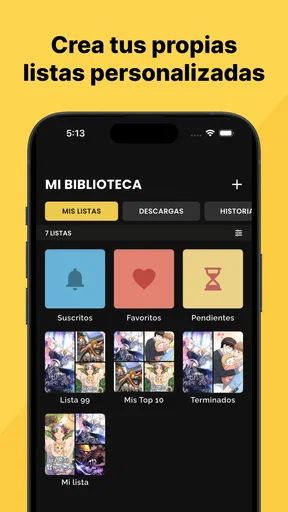
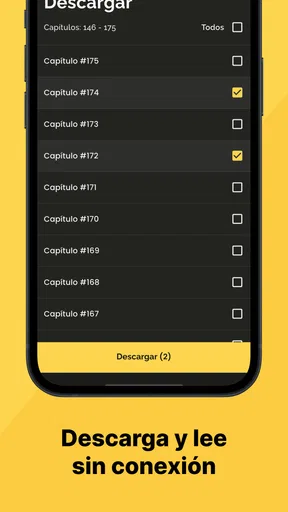
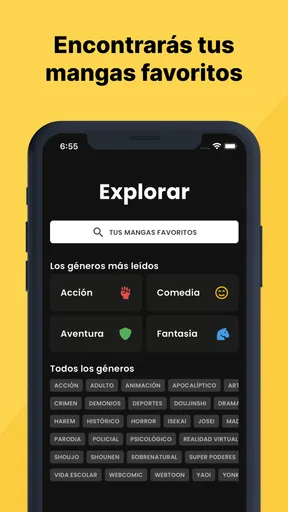
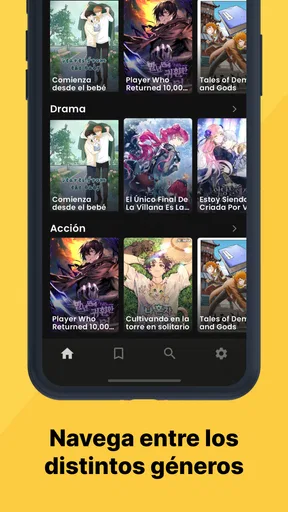

Our Review of KanX - Mangas en Español
 Analysis by Appyee
If you’re opening a manga app for the first time, the best test is simple: can you find a story you actually want to read, get through a few pages comfortably, and remember where you stopped? That’s the practical lens I’d use with KanX - Mangas en Español. It’s a free comics app from Kraimoz Team X, aimed at readers who want manga in Spanish. Its 4.7 average from around 8,600 ratings suggests plenty of readers have found a reason to keep it installed, though your own experience will depend on what you like to read and how you prefer to browse.
What to expect from a Spanish manga reader
I’d approach KanX as a place to look for Spanish-language manga and settle into a reading routine, rather than expecting it to replace every way of discovering comics. Its focus is useful if you would rather read in Spanish than work through a translation in another language. The app has more than 500,000 installs, but a large audience doesn’t guarantee that every title or reading style will suit you; the right first move is to search for a series or genre you already enjoy.
The app is rated Teen, which is a helpful starting point for families and younger readers, but I wouldn’t treat an age label as a promise that every individual story will fit every reader. If you’re choosing manga for someone else, check the content of the specific series before settling in. KanX is free to install, with optional in-app purchases ranging from $1.49 to $34.99 per item, so I’d take a moment to understand any purchase prompt before confirming it.
Diving into the Manga World
The first thing you notice about KanX - Mangas en Español is its user-friendly interface. It’s designed to make your reading experience smooth and enjoyable. Whether you’re a newbie or a seasoned manga reader, finding your way around this app is a walk in the park. The home screen greets you with a selection of popular mangas, new releases, and even some hidden gems that the app thinks you’ll love. It’s like having a personal manga curator!
Starting without getting lost
When I try a reader for the first time, I don’t begin by scrolling endlessly through recommendations. I search for a title I already know, then open a chapter and check whether the Spanish text, panel layout, and page pacing work for me on my phone. That small test tells me more than a long browse: I can judge the reading itself before investing time in a new series. KanX’s search makes this a natural first step, while the home screen is there when I’m in the mood to explore instead.
If you’re unsure what to read, choose one familiar genre and use it as a filter for your own attention. Recommendations can be a good nudge, but I treat them as a shortlist rather than a guarantee that a title will match my taste. A useful habit is to open a promising series, read enough to understand its tone, and only then decide whether it deserves a place in your regular rotation. This keeps discovery enjoyable instead of turning it into a session spent collecting titles you never start.
Features That Stand Out
One of my favorite features is the search bar at the top. It’s not just a regular search tool; it’s intuitive and smart. You can search by title, author, or even genre. The app also suggests titles based on your reading history, which is a neat touch if you’re looking to discover something new. Plus, the app’s library is constantly updated, so you never run out of new material to devour.
For a first session, I’d use search in two passes: try the exact title first, then broaden the query to an author or genre if you don’t find what you expect. That gives you a practical way to distinguish a missing result from a search that was simply too specific. I also wouldn’t rely on suggestions alone when looking for a particular series; recommendations are better for browsing than for confirming that a specific edition or chapter is available.
Personalized suggestions are most useful after you’ve read enough for your interests to be clear. If you sample several unrelated titles quickly, the recommendations may feel less focused than you hoped. I’d build a more useful reading trail by following one or two series that genuinely appeal to me, then checking what the app surfaces next. It’s a small change in how you browse, but it makes discovery feel more deliberate and less like picking at random.
Another standout feature is the ability to download mangas for offline reading. This is perfect for those long commutes or when you’re stuck somewhere without WiFi. Just download a few chapters when you have internet access, and you’re good to go. The app also saves your spot, so you can pick up right where you left off.
Offline reading works best as a little bit of preparation, not a last-second rescue. Before leaving home, I’d open the series I plan to read, download the chapters I expect to need, and confirm they are available to open. For a daily commute, a short selection is easier to manage than downloading far ahead and forgetting what I saved. If you share a device or switch between several series, checking your current chapter before going offline can also prevent the familiar “where was I?” pause.
Making the first reading session count
My first meaningful success with KanX would be finding a known manga, opening a chapter, and reading enough pages to see whether the presentation feels comfortable. That’s a better starting point than trying every control at once. If the page looks too small, test zoom; if the screen feels tiring, try the display adjustments that suit you. Once I know the reading flow works, I can bookmark a page or make a note only if I have a real reason to return to that moment.
A realistic use case is a train ride home: while I have a connection, I find a series and save a few chapters for later. On the train, I can read without depending on the signal, and the saved position helps me resume after a stop or interruption. The trade-off is that this routine asks for a little planning. If I only decide what to read after losing internet access, the offline option won’t help with chapters I never downloaded.
A Seamless Reading Experience
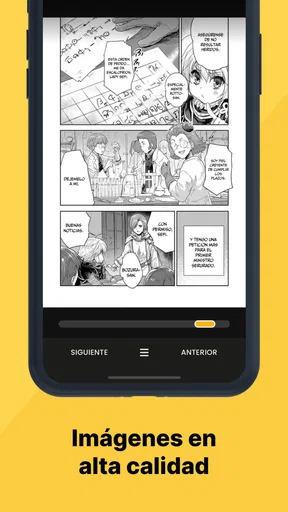
Reading on KanX is a delight. The pages load quickly, and you can zoom in and out with ease. The app supports both portrait and landscape modes, so whether you’re on a tablet or a phone, you’re covered. Adjust the brightness and switch to night mode for those late-night reading sessions. It’s all about customization and comfort.
I’d choose portrait for a quick phone session and test landscape when panels or lettering feel cramped, rather than assuming one orientation is always best. Zoom can rescue small text, but frequent pinching interrupts the rhythm of a page, so I’d first try changing orientation or brightness. Night mode and brightness adjustments can make a dim room more comfortable, yet I still prefer keeping the screen easy to read instead of making it so dark that details disappear.
For anyone deciding between a phone and a tablet, the main difference is how much page space you want in hand. A phone is convenient for short breaks and commuting; a larger screen can make detailed panels easier to inspect. I’d try the same page in both orientations before settling on a routine. The most comfortable setup is the one that lets you follow the artwork without repeatedly adjusting the screen.
Oh, and did I mention the bookmarking feature? It’s incredibly handy. Bookmark your favorite pages or scenes you want to revisit, and they’re just a tap away. You can even make notes, which is great for jotting down those "aha" moments or theories about the storyline.
Bookmarks and notes can serve different purposes, so I’d keep them intentional. A bookmark is handy when a particular page matters; a note is better when I want to remember why I saved it, such as a clue or a question about a character. I wouldn’t mark every interesting panel, because an overloaded collection is harder to use than simply returning to the chapter. A few meaningful markers make rereading more useful without turning reading into record-keeping.
Common points of confusion
One distinction worth keeping clear is between browsing for a title and confirming that it is available in the form you want to read. Search is the sensible first check, but a result alone doesn’t tell me whether I’ll enjoy the translation, pacing, or presentation. I open the chapter and judge those things directly. Likewise, a recommendation is an invitation to sample a story, not proof that it will become a favorite.
Another possible source of friction is the difference between free access and optional purchases. KanX costs nothing to install, but individual in-app purchases are offered. I’d read each purchase screen carefully and make sure I understand what I’m choosing before tapping through, especially if a younger person uses the device. That’s a calmer approach than assuming every part of the experience has the same cost simply because the app itself is free.
The app runs on Android version 7.0 or later, and its current release is version 1.4.3. If installation is your first hurdle, checking your device’s Android version before you begin is a quick way to avoid confusion. The app has 25 written reviews alongside its much larger ratings total, so I’d use the overall score as one signal, not as a substitute for trying a chapter and deciding whether its Spanish-language reading experience suits me.
Community and Interaction
What sets this app apart is its community feature. You can comment on mangas, share your thoughts, and even interact with other readers. It’s like being part of a global manga club. Discuss plot twists, character development, or just gush about your favorite scenes. The community is vibrant and welcoming, making the reading experience even more enriching.
I see comments as an optional extra rather than part of the reading itself. If I’m following a chapter as it appears, I’d be cautious about opening discussion until I’m comfortable with the possibility of encountering other readers’ reactions. For someone who enjoys comparing interpretations, comments can make a series feel less solitary; for a reader who wants to avoid spoilers or prefers quiet reading, it’s easy to focus on the pages and leave the conversation for later.
Compared with the usual alternatives, KanX’s clearest appeal is its Spanish-language focus and the combination of reading tools with reader discussion. A general comics reader may offer a broader mix of material, while a web browser can be useful for searching across many sources. Those options may suit readers who prioritize breadth or independent searching. I’d choose KanX when I want a Spanish manga-oriented place to browse and read; I’d choose another route if I need a particular catalog, format, or reading experience that I can’t find here.
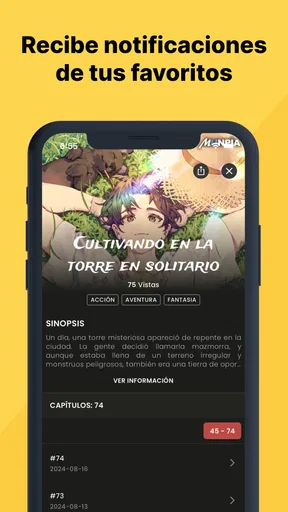
Another cool aspect is the notifications feature. Stay in the loop with alerts about new chapters of your favorite series. You’ll never miss a release, and you can be one of the first to dive into the latest adventures.
Notifications are most useful once I know which series I’m actually following. I’d avoid turning every alert on by habit; a smaller set of reminders for titles I care about is less distracting and easier to act on. If I’m only browsing, I can wait until I’ve read a chapter or two before deciding whether a series deserves a place in my ongoing list of interests.
Who will get the most from KanX
I’d recommend it first to someone who reads manga in Spanish, wants a straightforward way to look for stories, and values being able to continue offline after planning ahead. It can also suit a returning reader who already has a few titles in mind and wants search, saved progress, and optional community discussion in one app. The strongest fit is someone willing to try a chapter and shape their own routine, rather than expecting recommendations to do all the choosing.
I’d be more cautious if you need a very specific title, prefer reading in another language, or want a catalog and format you can verify before committing to a long series. In those cases, compare your options first and test the exact reading experience you care about. Readers who dislike comments or notifications can simply avoid making them central, but anyone looking for a strictly silent, minimal reader may prefer a simpler alternative.
Final Thoughts
In a nutshell, KanX is a brilliant app for any manga fan, especially if you prefer reading in Spanish. It’s packed with features designed to enhance your reading experience, from offline access to a thriving community. Whether you’re discovering manga for the first time or you’re a long-time fan, this app is your gateway to countless adventures and stories.
So, what are you waiting for? Dive into the world of manga with KanX and let your imagination run wild. Happy reading!
Verdict
Strengths of KanX - Mangas en Español
- Extensive manga library available.
- User-friendly interface design.
- Offline reading mode supported.
- Regular updates with new content.
- High-quality images and text.
Limitations of KanX - Mangas en Español
- Contains some ads in free version.
- Limited customization settings.
- Requires internet for initial download.
- No English language option available.
- Occasional loading delays reported.
Similar Picks in This Category
View All
WEBTOON: Manga, Comics, Manhwa
NAVER WEBTOON4.6

MangaToon: Comic & Manga
MangaToon4.3

네이버 웹툰 - Naver Webtoon
NAVER WEBTOON4.3

Tapas – Comics and Novels
Tapas Entertainment Inc.4.2

Lezhin Comics - Daily Releases
LEZHIN ENTERTAINMENT3.3

WebComics - Webtoon & Manga
WEBCOMICS HOLDINGS HK LIMITED4.4
Frequently Asked Questions
What is KanX - Mangas en Español?
KanX - Mangas en Español is a mobile application designed for manga enthusiasts who prefer reading in Spanish. It offers a vast library of manga across various genres, providing users with a seamless reading experience. The app features both popular and lesser-known titles, catering to diverse tastes and preferences.
Is KanX - Mangas en Español free to use?
KanX offers a free version with access to a substantial collection of mangas. However, some features or specific titles may require a premium subscription. The premium version typically offers an ad-free experience and early access to new releases, enhancing the overall user experience.
Can I read mangas offline with KanX?
Yes, KanX allows users to download mangas for offline reading. This feature is particularly useful for those who want to enjoy their favorite titles without needing a constant internet connection, making it convenient for travel or areas with limited connectivity.
How often is new content added to KanX?
KanX regularly updates its library with new chapters and titles. Users can expect frequent updates, ensuring access to the latest releases and keeping the content fresh. Notifications about new additions help users stay up-to-date with their favorite series.
Is KanX available for both Android and iOS?
Yes, KanX - Mangas en Español is available for download on both Android and iOS platforms. Users can find the app on Google Play Store and Apple App Store, ensuring compatibility with a wide range of devices.
